A comparison of bike-computer iPhone apps

Although most serious cyclists use dedicated head units, I’ve used iphone apps for about as long as I’ve had an iphone. I haven’t used all the apps that are out there, but I have used a few.

My own cycling interests lean towards long-distance rides and bikepacking. Nearly all my rides are solo. This informs what I do and don’t prioritize in an app. I currently do not have a power meter, although that will change at some point. I do use a heart-rate monitor.

The way I use all of these apps during a ride is mostly to rely on periodic spoken updates (via a bone-conduction headset) for my stats rather than looking at the screen. This lets me keep the screen dark, which makes a huge difference in battery life. Although I can keep my phone charged on the road as long as it’s not raining, I have ridden through rain that prevented me from charging my phone for 12 hours, and finished the ride with about 25% battery reserves. So these spoken updates are important to me. I set up each of these apps to recite my average speed and average heart rate for the entire ride, and for the past 15-minute split. I use this to judge my pacing. What I have found is that Ride with GPS doesn’t get these stats correct. Most (but not all) of the updates give the same values for the whole ride as for the last split, which is mathematically impossible unless I have perfect consistency (I don’t). Cadence and Cyclemeter seem to get these right. Navigr8 doesn’t give the option of reporting split average heart rate, though it will report split average speed.

The Ride with GPS app requires that you have an account with the service to use it, although they do offer free accounts as well as two tiers of paid memberships. Navigr8 requires you create an account on sign-in. Cyclemeter, Cadence, and Navigr8 all offer paid subscriptions to unlock additional features; I’ve paid for subscriptions to all of them and am evaluating them on that basis without paying attention to what is available at the free tier.

Cyclemeter, RwGPS, and Cadence all offer live tracking so that the folks back home can monitor your progress: the apps generate a link to a check-in page that you can send out. Cyclemeter can also e-mail notifications at regular intervals. Obviously these all depend on having internet connectivity during your ride. If you and the people who tracking you have Apple products, you can just use Find My, so this is mostly useful when sharing your progress with someone who does not.

Cadence and Navigr8 can keep the screen active but dimmed—I think of this as pseudo-locking. This is nice because it means you don’t need to unlock the screen in order to view the dashboard, just tap on it, but it also means that the screen is susceptible to unintended taps, and on Navigr8’s busy screen, that’s potentially a problem.

Battery life

The usual knock against using a smartphone as a bike computer is that the battery life isn’t good enough. I just described how I’ve adapted to using periodic spoken updates instead of keeping the screen on. But what if you want to keep the screen on, and don’t have a dynamo hub to keep the phone charged? What kind of battery life could you get?

I have an iPhone 16 Pro. This model is known to have great battery life in general. It’s about a year old and the battery health is rated at 100%. I set up Cyclemeter to keep the screen on for the duration of my ride, turned on energy savings, turned off wifi, and left the screen brightness at whatever level I normally keep it at (good enough for most conditions, but not direct sunlight). I had two Bluetooth devices connected: a heart-rate monitor, and a bone-conduction headset (playing music for most of the ride). After a ride lasting 2:50, the battery was at 82%. Assuming the burn rate is linear, this works out to about 6.35% per hour, or about 15.75 hours of use. Call it 12 hours to leave something in reserve in case of emergency. That is not as good as a top-tier bike computer, but it is good enough for a lot of situations.

Cyclemeter

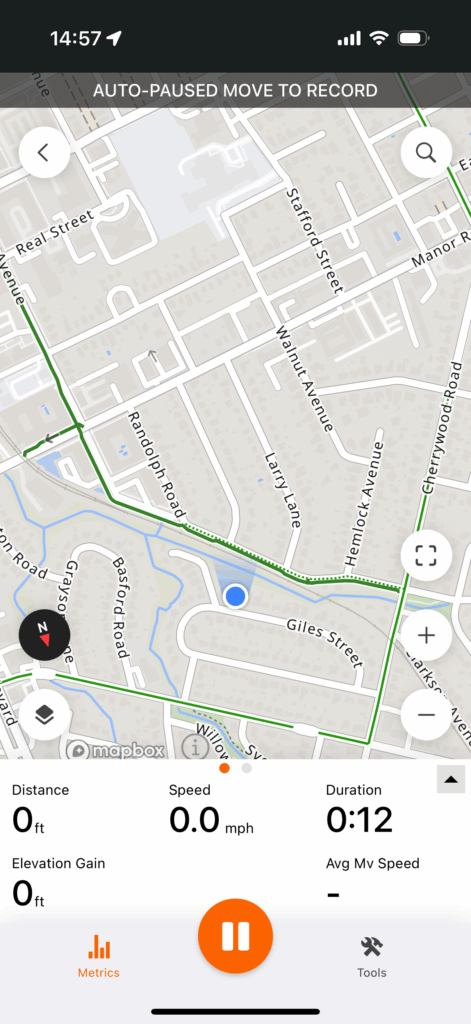
Cyclemeter is one of the oldest apps on the App Store, and it shows. It is decidedly old-school in some ways: it relies on e-mail for outbound communication. It has a monolithic database rather than individual route/ride files. It organizes rides based on routes, which makes a certain amount of sense when performance over a known route is the only way you have of judging your fitness progress, but makes less sense in light of newer training metrics. Setting up the dashboard (Cyclemeter calls this the “stopwatch”) pages is really tedious.

It’s not all bad though. The dashboard display is the best of the lot, and is the only one that looks like a native app (it was developed for the iPhone but eventually was released for Android also). There’s good “fit and finish” on everything. Someone using the app for the first time should be able to launch it, tap the Start button, and go for a ride without any further instruction: the basic features are intuitive.

One quirk of this app is that although it can show a map view as a dashboard cell, you can’t pan or zoom that map. Instead, there’s a separate map tab for that. The dashboard can show a course elevation profile, but this is barely readable.
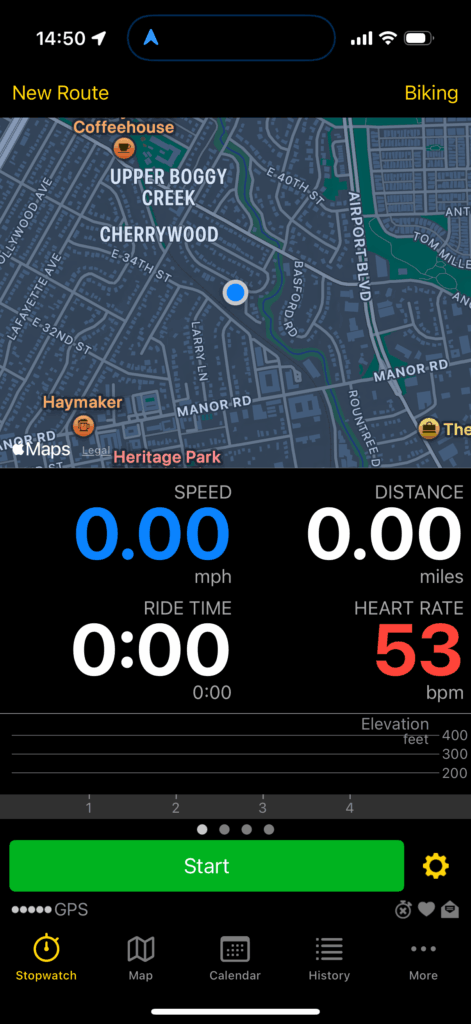
A Cyclemeter dashboard panel

Ride with GPS

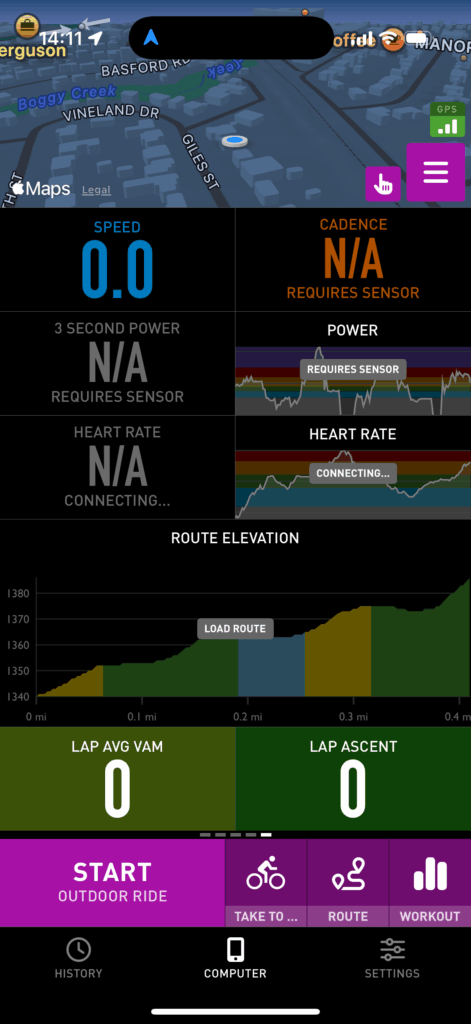
RwGPS is better known as a service for designing and sharing routes, but they do offer their own bike-computer app that is closely integrated with the service. RwGPS has staked out a different territory than Strava, and is not so much oriented toward performance cycling as toward touring, long-distance riding, and route-sharing. It does have segments and some of the same social features as Strava, but these don’t seem to be widely used. The app reflects this different focus. It lacks some pretty basic features, like a lap button. The dashboard screens give limited customization: you get 2 pages with 5 fields each, and you can customize what goes in each of those. And those fields are displayed in small type—the focus is on the map. But the app gives very fine-grained control over navigational alerts.

This is the only one of these apps that does not offer a dark mode. This is not just an aesthetic matter: all newish iphones have OLED displays, which means that only the lit-up pixels use electricity. A display that is mostly black will use less power. RwGPS partially makes up for this by being the only one of these to use live updates on the lock screen, a relatively new iOS feature, which lets you check your basic stats without unlocking the screen at all.

As far as I can tell, RwGPS is the only one of these apps that will display a cue sheet.

Like Cyclemeter, it’s intuitive. A first-time user shouldn’t be confused by it. A very high degree of “it just works.”
A RwGPS dashboard panel

Cadence

Cadence is a newer app that’s trying to do it all: it acts as a regular bike computer, it lets you design routes, and lets you design structured workouts. This is ambitious for a one-man shop.

The way you edit the dashboard pages in Cadence is to go into the settings, where you can view a simplified schematic of your grid, and tap on cells to set their contents. Cadence gives you a lot of flexibility in how you populate the grid; it’s the only app that will show three cells in a row, and it maintains a completely separate set of dashboard layouts for landscape orientation. It’s the only one of these apps designed to work in landscape as near as I can tell. It can also show graphs in cells (of heart rate, for example), although this is just a novelty if you’re cramming the graph into a small cell.

One quirk of this app is the companion Apple Watch app: When you go for a ride, the Apple Watch will normally detect that you’re going for a ride, tap you on the wrist, and ask if you want to record the ride using Apple’s own Workout app. If you’re using one of these apps, you probably don’t want to do that. Cadence’s watch app will override the “do you want to record this?” notification, but not the wrist tap, which quickly gets annoying. I haven’t found a way to prevent that, short of turning off reminders from the Workout app entirely. I mentioned this to the developer and he shrugged it off. This is too bad because I like Cadence’s watch app better than any of the others on its own merits.

In theory, Cadence can import externally created routes, but in practice, this feature is not useful: it can only import GPX files, and it seems that a GPX file can either contain a path, or waypoints, but not both (or at least, RwGPS will only export one or the other but not both). It seems that the author is more focused on fleshing out the app’s internal route-design features than working with external services like RwGPS.

This is the only one of these apps that can run structured workouts. As of this writing, it cannot control a smart trainer, but the company’s website says that is planned for a future release. That would add a lot of value to this app.
A Cadence dashboard panel

Navigr8

Everything about Navigr8 is just nerdy and cartoony, starting with the name. The dashboard display is unpolished, with colorful icons, gridlines that are inconsistent and get chopped off by the screen’s rounded corners (not obvious in the screencaps), bad typography (is that…Arial?). The off-track and on-track trumpets sound like they’re from a circus. The map tiles try to cram way too many controls in, and in direct sunlight, they’re barely visible. The overall fit and finish feels poor. Although all these apps let you swipe left and right through dashboard pages (even RwGPS), this is the only one that doesn’t show swipe animations, which is frankly jarring.

Another jarring aspect of this app is that navigation and ride recording are separate operations. Normally one would load a route, tap the start button, ride the route, tap the stop button, and you’re done. With this, you load the route, tap the “navigate” button to navigate it, tap the “record” button to record the ride, then tap the “stop” button to finish the ride, and tape the “on track” (or “off track”) button to stop navigating.

The way you edit the dashboard on this app is by defining the grid in the settings, and then on the dashboard itself selecting each cell to decide what goes into it.

Navigr8 gamely attempts to estimate power based on what data you can give it if you don’t have a power meter, but I don’t believe the numbers it produces are remotely accurate.

It supposedly has something like Garmin’s ClimbPro that pops up an elevation profile when you’re on a big climb, but I did not see this. The elevation-profile cell shows a fixed-distance look-ahead, and can step through a few distance options.

One great feature is the ability to add a waypoint while riding, with a spoken note. The documentation goes into considerable detail on its waypoint features, and how they can be used to trigger certain events, which sounds interesting, but isn’t something I’ve tried.

I eventually got imported routes to work correctly, but it took some experimentation. There are a number of file formats that can be used in conjunction with bike-computer apps. GPX, FIT, TCX, KML. GPX is probably the best known, but least useful for sending turn-by-turn directions. It seems that a GPX file can contain either the route as lines on the map, or directions, but not both. FIT can contain both, and is a binary file format. TCX can contain both, and is an XML format. Navigr8 could import a FIT file, but treated it as the route only, without directions. A TCX file worked correctly, with both the route and directions and a custom POI that I added working correctly.

Getting a TCX file from RwGPS into it is a bit of a trick. The RwGPS app will not export TCX files or share them using the standard share sheet. In order to get the TCX file:

  • Open the RwGPS website in your iphone’s browser.
  • Navigate to the route you want, and under the MORE menu select “Export as File.”
  • Choose the “TCX Course” file type and download it.
  • Open the Files app. The Files app separates your files between “on my phone” and “iCloud Drive.” Make sure you’re in iCloud Drive.
  • Open the Downloads folder.
  • The downloaded TCX file should be at the top of the list. Press and hold on it to bring up a menu of options, and tap Share.
  • From the resulting list of share targets, select Navigr8. You might need to scroll to the side of the sideways list of target apps and tap “More” to find it.

This is kind of a pain. RwGPS could make it easier if they wanted to.

Navigr8 has a lot of promise, but it needs a lot of work.
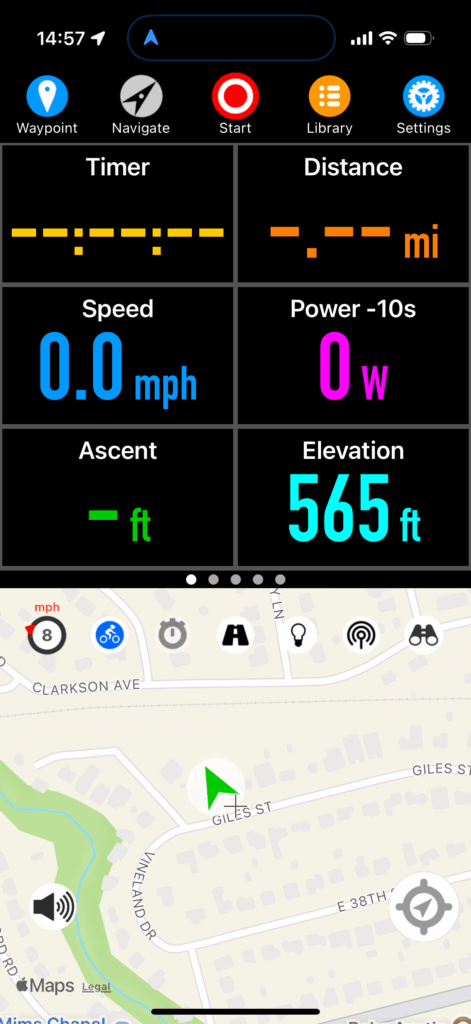
A Navigr8 dashboard panel

Feature comparison

Feature Cyclemeter RwGPS Cadence Navigr8
Dashboard
Custom dashboard pages 🟢 🔴 🟢 🟢
Music control 🟢 Locally stored music only 🔴 🔴 🔴
Weather data 🟢 🔴 🟢 🟢
Elevation profile 🟢 🟢 🟢 🟢
Offline map tiles 🔴 🟢 🟢 🟢 Possible but awkward
Map providers Apple, Google Numerous Apple, Google, Mapbox Apple, Google
Lap button 🟢 🔴 🟢 🟢
Custom screen lock 🟢 🟢 🟢 🟢
Screen dim 🔴 🔴 🟢 🟢
Integrations
Ride with GPS 🔴 🟢 🔴 🔴
Training Peaks 🔴 🔴 🔴 🔴
Intervals.icu 🔴 🔴 🟢 🟢
Strava 🟢 🟢 🟢 🟢
Apple Health 🟢 🟢 🟢 🟢
Navigation
Turn-by-turn directions 🔴 🟢 Works with RwGPS maps only 🟢 Internally designed routes only 🟢 With some trouble
Live tracking 🟢 🟢 🟢 🔴
Notifications
Live activities on lock screen 🔴 🟢 🔴 🔴
Periodic spoken notifications 🟢 🟢 🟢 🟢
Other
Apple Watch companion app 🟢 🟢 🟢 🟢
Alternative display device 🟢 House-brand dashboard panel 🔴 🟢 ActiveLook AR glasses 🟢 ActiveLook AR glasses
Training Plan manager 🟢 🔴 🟢 🔴
Ghost competitor 🟢 🔴 🔴 🟢

Other thoughts

Most bike-computer apps offer a lot of flexibility in dashboard layout, but not a lot of discipline. It would make more sense to have rows of related items. Like all heart-rate data on one row, all weather day on one row, etc. Grouping like data together should make it possible to show more data more clearly in less space.

They also don’t show a lot of creativity in how data is displayed—for the most part, they’re taking the same “spreadsheet” approach that head units do, when so much more is possible. I’d love to see a histogram of my heart rate with the current zone highlighted, for example. But to take the spreadsheet concept in a different direction, a bike-computer app could give users the option to fill each cell with the result of a formula, given certain data primitives as terms in the formula. To go a step further, I imagine an app where the dashboard is a WebKit view that takes advantage of HTML, CSS, Javascript, and a library like D3 for data visualization. Custom fields could be shared as small chunks of code.

Years ago, when Saab was a company that made cars, they had a feature they called “night panel,” which would black out all the instruments except for the speedometer and anything that required your attention. I imagine something like this for a bike-computer app, where the screen “pseudo-locks” the way Cadence does, and you can specify certain fields that will stay lit up in this state.

If you use Training Peaks or other external services that aren’t well-supported, you probably want to download either HealthFit or RunGap. These both act as “switchyards” for your workout files, and can sync them to and from external services. I’ve tried both and am currently using HealthFit.

Old Dime Box Revisited 600K

Randonneuring is a cycling discipline—is sport the right word?—that’s somewhere between racing and touring. You complete a planned route before a certain cutoff time, but finishing order doesn’t matter. Rando events have a few standardized distances: 200K, 300K, 400K, 600K, and 1000K. There are longer events as well, including the big show for randonneuring, Paris-Brest-Paris at 1200K. Each of these has a standard cutoff time; for a 600K, it’s 40 hours, and that includes whatever sleep and other off-bike activities you need to squeeze in.

Our local chapter posts a series of events every year, and I was interested in completing a 600K, so I signed up. It turns out I was the only person who signed up.

I’ve ridden nearly the same distance over a two-day period in my failed attempt at the TABR in 2023, although the circumstances were different then—I was in better shape, but I was carrying a lot of cargo. There was much more climbing, but Day 1 also had a massive tailwind. So it’s hard to compare the efforts.

I went into this knowing that I was pretty under-trained for this attempt, and would be getting through it on the basis of good pacing and orneriness.

Day 1

Day 1 was a 357-km (222-mile) loop heading northwest > northeast > southeast > southwest. I had probably been on half the roads at some point before. In general, the area west of Austin is hilly and dry; to the east it’s flat and wetter, with a lot of farmland. I generally prefer the former to the latter both in terms of aesthetics and riding quality. Hills are interesting and have knowable end-points. But in the flat farmland to the east, there is nothing to slow down the wind, which just grinds you down. Very few trees for shade.

Around Krause Springs, I noticed that the Hill Country Ride for AIDS was underway, and passed some of the participants. Gwen and I did that ride back in 2005. I noticed this time around a lot of the riders were on ebikes. This is a good place for it, because it is one of the prettiest places in Texas, especially when the wildflowers are in bloom.

I stopped for a sandwich in Marble Falls, about a quarter of the way through. This was the last real food I’d have until I got home. Mostly I was fueling myself with fruit-based energy blocks and the occasional Snickers bar. Appropriate fueling is a problem for me because in a Zone-1/2 ride like this, I can go for a really long way without bonking—I’ve finished 200Ks on no more than a few energy bars. But certainly this ride would put me deep in the red, and bonking would be really ugly.

I had been feeling a little off up to this point—nothing specific I can point to. I was nervous about this ride, and perhaps I was burning off that anxiety. After Marble Falls, I got into the zone better—and zoned out. I turn inward on rides like this, just focusing on what I’m doing, not so much on my surroundings, except for traffic.

Burnet had what seemed like it had once been a grand downtown, but was almost completely vacant now.

Florence was weird—there was a sharp rich/poor divide, only made more apparent by the fact that there’s basically one downtown street where the two sides are forced together. Some guy who was very impressed with his car (and its modified exhaust system) was making passes up and down the main drag rattling the windows.

When I reached Milam County, I was still about 60 miles from home, but I felt like I was on home turf—I know the roads, and I know the area. I had been riding conservatively to that point—and had mostly been riding into headwinds—and at this point, I knew I could turn up the heat a little bit. My knees were bothering me a little bit. Not the kind of trouble you get from bad positioning, just the cumulative effect of a lot of miles. I’d had some brief and minor episodes of hotfoot, but nothing bad (and never in the same place twice). At this point, my ass was really starting to bother me.

I rode the last 30 or so miles in the dark. And for the last 15 or so, my speed dropped off. This was not so much because I was tired (though obviously yes I was). I was losing the mental discipline to keep my speed up; I was on increasingly urban roads with more twists and turns. And I was keeping in mind the advice “don’t ride faster than your guardian angel can fly” (that is, don’t outrun your headlights).

I got home at about 11 PM, showered (I smelled like something a vulture would refuse to eat), ate, plugged in stuff that needed recharging, put some drip-wax on my chain, and crashed.

My ass was hamburger meat and my knees were kind of bothering me.

I slept amazingly well, and woke up before the alarm I had set.

I was a little dilatory getting out the door to begin Day 2, and probably could have saved half an hour there. I had about 8.5 hours of downtime from the time I got home until I left. A lot of people riding a 600K would opt for less sleep than I did.

My ass was still on fire, and my knees were still not great. I knew Day 2 would be a slog.

Day 2

Day 2 was an out-and-back route to the east, so, flat farmlands with no shelter from the wind. And like Day 1, it was all headwind for the first half. I knew that my performance would drop on the second day, but I wasn’t sure how much. It turns out the answer was “a lot.” I use the Ride with GPS app to read my cues and record my ride, and it reads out my stats at 15-minute intervals. Under normal conditions, I’d want to keep my heart rate between 120 and 130. On Day 2, my heart rate for a 15-minute interval didn’t go above 110 until the last hour of the ride. I couldn’t push it harder.

Similarly to the day before, I stopped at around the 60-mile mark for a sandwich, and again, that was the last real food I had until I got home. If fueling is a problem for me, hydrating is probably a bigger problem. I keep reminding myself to drink more, and I keep not drinking as much as I should. I’m sure I started Day 2 dehydrated, and I was really beginning to feel it. I know that when we eat, our digestive tract takes water from our bodies to process the food, and I kept asking myself “am I drinking enough to get any benefit from the food I’m eating?” The answer was probably “No.”

At the start I was taking it easy on my knees, but at around the halfway point, they started to feel a little better. My ass did not start feeling better, but I eventually kind of came to terms with it. I spent as much time as possible on the aerobars because that took some weight off my butt, and rotated my position so a less-sensitive part of my butt was on the saddle. What I realized when I was getting toward the finish of Day 2 was that I had been using my aerobar grips and armrests to slightly cantilever my butt out of the saddle, and the pressure on my forearm was tweaking those muscles and my pinkies and ring fingers, probably due to pressure on the ulnar nerves. Also, with just a few miles to go, I developed intense hotfoot on the balls of both feet, probably again from trying to keep weight off the saddle.

I finished with exactly 90 minutes remaining before the cutoff time.

Day 2 was not fun. I did not much like the area I was riding through, and my pain made it difficult to enjoy the ride regardless.

The bike I was riding is set up for comfort. It’s got a position I can hold all day. It’s got a suspension seatpost and stem (I can barely imagine what condition I’d be in if I’d been riding on a rigid seatpost). My tires could be fatter, but they were at a low enough pressure to absorb some bumps. And I’ve ridden similar distances before without being so badly pulverized. So I’m not sure why I feel so beat up now. I think there are two factors:

  1. My previous long-distance efforts were on better roads.
  2. I haven’t been doing a lot of long-distance riding lately to toughen myself up.

Like I said before, I got through this on orneriness. I wanted to prove to myself that I could do it. If I do it again, I’ll go into it with better preparation.

Reasonably priced bike gear

Cycling is expensive. Any activity that requires equipment is going to involve some expense, and cycling’s equipment requirements are fractal in nature. You don’t just get a bike, you get clothing. You don’t just get clothing, you get warm-weather clothing, and foul-weather clothing, and cold-weather clothing. You get tools, and not just tools, but tools you carry on the bike and tools you use at home. And so on.

As with most things, you reach a point of diminishing returns in terms of price:performance as you spend more and more money on bike stuff. Where that point lands is an interesting question. There are some good deals out there.

I am in the USA and writing this mostly for a U.S. audience. I’m a roadie so that’s what I know.

Bikes

There are often closeouts on last year’s model of bike, and there are some ebay vendors that seem to specialize in this: here’s one. They have a top-end 2021 model listed for less than half its original retail price (but still very expensive).

The difference between this year’s model and last is usually trivial or nonexistent. Every few years, manufacturers will roll out new versions of their models, but these are not generally earthshaking changes.

Note that when buying a bike this way, it still needs a fair amount of setup work, some of which might not be obvious. You’ll either need to be a competent bike mechanic or hire one to set it up, which will offset some of the discount. Shipping will also be a chunk of change.

There are a number of direct-to-consumer bike brands now. I haven’t ridden any of these, but they’ve been favorably reviewed.

As of this writing, a Trek Domane SL5 is listing for $3500, compared to $2000 for a Canyon Endurace CF7 or $1800 for a Fezzari Empire Sport (on sale right now). These are all carbon-framed endurance bikes equipped with Shimano 105 (11-speed)—very respectable, especially for a cycling newcomer. There may be differences in “finishing kit”—saddle, handlebars, etc—and tires that change the balance somewhat.

There are benefits to buying a bike from a local bike shop. They normally throw in a tune-up for free, and will often let you substitute parts to make the bike suit you better for cost. And that’s something you should be prepared for: the stem might be the wrong length, the handlebars the wrong width, the saddle might just be wrong. And there is a benefit in having a relationship with a local bike shop. But damn, that’s a big price difference to overcome. You can pay retail for new saddle, stem, and bars and still come out way ahead. As with a remaindered bike, it would probably be a good idea for cycling newcomers to pay a shop to set up their consumer-direct bike, even though those consumer-direct brands do a better job of shipping the bikes in a ready-to-ride condition.

Clothes

Cycling kit can be ludicrously expensive. The brand that seems to be at the top of the heap, Assos, has a jacket they charge $700 for. Most of us aren’t riding at a level where we can benefit from the marginal performance improvements at those high prices. Here’s some recommendations:

  • The Black Bibs. Basic designs. Three grades of bib shorts: I’ve got the cheapest ($40) and the most expensive ($80). The expensive ones aren’t as nice as my (much more expensive) Castellis, but they’re absolutely good enough for most riding.
  • Wiggle’s house brand DHB. Wiggle is a UK sporting-goods vendor. They’ve got a few tiers of clothing products that span a wider price range than The Black Bibs. With the post-pandemic bike bust, they’ve been having financial difficulties, and I read that they might be suspending sales outside the UK, but for now, they still seem to sell internationally.
  • Galibier. A small UK-based brand. I’ve gotten quite a bit of foul-weather gear from them. Good quality, reasonable prices.
  • NeoPro. Another inexpensive U.S. brand. As far as I can tell, these guys have one tier of product in everything, and their pricing looks to be in the midrange compared to The Black Bibs. I have not bought from them.

I don’t have any recommendations for shoes. I’ve got one pair of Pearl Izumi cleats that fit me fine, and another from the same brand that I can’t get comfortable in (and would like to sell, if you’re interested). Fit is so contingent on the individual.

Accessories

There are a lot of expensive accessory brands and some reasonably priced accessory brands, but I’m not aware of any distinct bargains. Cheap tools are never a bargain in my experience.

I’ve always had good luck with pumps and tools from Lezyne, and tools from Pedro’s—Pedro’s makes the best tire levers.

If you are jumping into cycling, you should budget for some of this stuff: You should carry on your bike a mini pump, a couple of tubes, a set of tire levers, and a multi-tool. And have some place to store all this stuff—in your jersey pockets, a seat bag, etc. At home, you probably want at least a floor pump. A set of hex wrenches and other hand tools is nice but not necessary. Wera makes excellent tools and their Tool Check Plus is a nice compact home toolkit that’s a good value.

Dynamo hubs, USB converters, power banks, and phones

My bike has a SONdelux dynamo hub and I recommend it to anyone interested in distance riding, especially when self-sufficiency is important. I also ride with a power bank, and use my iPhone in lieu of a bike computer. A lot of cyclists dismiss using phones rather than dedicated head units, citing battery-life problems. If you use your phone exactly as you would use a head unit, battery life would be a problem, but you can use a phone differently, in a way that gives good battery life: leave the screen dark and rely on periodic spoken status announcements. For the kind of riding I do, this is fine. Both the Ride with GPS app and the Cyclemeter app can do this, possibly others. Even so, in a multi-day self-supported event, you still need to optimize your phone charging.

I have tried a few different mounting systems for my phone, and Quadlock, which makes the mount I am using currently, does offer a mount with a built-in Qi charger. I’ve tried it, it does work, but the mount is huge and charges less efficiently than the charging port. If you use one of these, you will end your ride with less charge than you started with. If you plug into the charging port, you can keep the phone at 100% charge.

You can charge the phone from the dyno via a USB rectifier (I have this, which is part of a kit with a dyno-powered headlight), or you can hook up a power bank in series and charge your phone and other electronics using pass-through charging. I’ve tried two different power banks at this point: the Nitecore and this Anker model. They both have the same capacity: 10k mAh. The Nitecore, attractively, is the smallest and lightest power bank with that capacity, but the Anker has a couple useful features. One is that it has a Qi charger on its body. This could be important if your phone’s charging port gets wet (this has happened to me on a long ride–it can take a long time for that port to dry out once wet): you can’t charge via the port when it’s wet, but with a Qi charger, you can still charge wirelessly. I also found that my bone-conduction headset draws so little power when it’s charging that the Nitecore pretends it’s not there, but the Anker recognizes it, and even has a special trickle mode. Note: I’ve got an older Nitecore. It looks like the new model also has trickle charging.

Both of these power banks do support pass-through charging, but they behave differently when receiving power from a dyno hub. If you are charging your phone via pass-through charging with the Nitecore, power is available from a very low speed–maybe 4 mph. The Anker requires a higher threshold to pass through the charge–maybe 9 mph–and on one day, I found that my speed was hovering around that threshold for a long time, so the phone was constantly entering and exiting a charging state. This is annoying if nothing else, and probably not great for the phone.

I also found that one of the iPhone cables I was carrying (I had a few) was fussy about its power source–it would not charge my phone when plugged into the USB rectifier, but it would charge from the power bank.

A smart setup might be to get two 5k mAh chargers (perhaps this), with one strictly receiving a charge from the dyno and the other discharging to power your other electronics, swapping the two as needed. This is slightly less efficient, but offers some redundancy.

Here’s a visual breakdown of the various charging schemes I discuss.

Ride report: Ontario, OR

I got off to a reasonably early start after sleeping like the dead. The weather was cloudy and cool, which was a nice change from the day before.

The first part of the day was riding along a dam reservoir on the Snake River. That was flat at least. Kind to my knees and easy for me to manage with my reduced power, although just the climb out of the river valley, starting at the Idaho border, was a challenge. This was followed immediately by a more serious climb that was just a slog. At the summit, traffic was stopped. There was a vehicle fire about a quarter of a mile down the road. I chatted with a couple of old-timers while we waited for emergency services to make the scene safe, which took the better part of an hour. No one was hurt, as far as I know.

Descended into the small town of Cambridge, ID. Rode around it a little to see what my dining options were–weirdly, the only restaurant on the map was a Chinese restaurant, but I found a coffee-and-sandwich place and stopped there to eat and assess.

Looking at my planning spreadsheet, I would be hitting one of the toughest climbs of the race, Lolo Pass, in a day or two. I didn’t think my knees could take it, and even if my knees weren’t a problem, my power output was so diminished I was worried about getting up it. I was already using my lowest gear on climbs that were hard but not that hard. I didn’t know how I’d get up Lolo Pass. Cambridge also looked like my best bailout option for a very long time, since I was pretty close to Boise.

I talked to Gwen about it for a while, but in the back of my mind, I knew it was over. One piece of advice I read for prospective racers was that you need to be really clear with yourself about why you’re doing this, because you will need that focus to sustain you through some very hard parts. I think that’s true, and I think my own reasons were nebulous. I’ll add to that: you need to really believe that what you’ll get out of it is worth what you put into it. Because you will put a lot into it. The juice needs to be worth the squeeze, and I realized right then that for me, it wasn’t. So I didn’t get what I wanted out of the race, but I did get something: knowledge of self.

Janie Hayes, who finished the TABR twice with fast times, wrote about scratching in the Tour Divide. I read that when I was preparing for TABR 2021, and was a bit mystified by it at the time, but it makes more sense to me now.

When I reentered cellular coverage in Cambridge, I also learned that a racer I had spent a fair amount of time around had since been diagnosed with Covid. I had no obvious symptoms, but it was concerning. I wondered if I had a mild case that was just bad enough to blunt my performance.

I did some checking and found a town with an Enterprise rent-a-car agency in Ontario, OR, roughly halfway to Boise, and without further ado, decided to ride there, rent a car from them, and road-trip home. Fortunately, that leg of the ride was mostly downhill–I was going fast enough to fool myself into thinking I was riding strongly, all of a sudden, and regretted my decision to scratch, but as soon as I hit even a bit of a climb, my regret went away. I incidentally saw the truck that had caught fire on the summit before Cambridge, being hauled on a flatbed. I stopped in the town of Weiser to get a snack and e-mail Nathan, the race director, word that I was scratching.

My first stop in Ontario was at a drugstore to get a home Covid test. I rented a hotel room and took the test: negative–I have to admit it would be nice to be able to blame scratching on it.

Next, arranging a car rental. Turned out not to be as simple as I thought. Enterprise seems to be the only car-rental agency with locations away from airports, but what I was quickly learning is that only the airport locations (for any rental agency) offer one-way rentals, which I needed. What I also learned is that even many of those airport locations would not offer a one-way rental, but Avis would. I booked the reservation online. I resolved to get an early start the next day, ride to Boise’s airport, and pick up a car. I had a plan. I was looking forward to taking a little road trip at this point, and made arrangements to see a couple friends along the way.

While this is going on, dot-watchers on the TABR facebook group have noticed I’m off course. From my hotel room, I checked in on the group and let them know I had scratched. Cody, a dot-watcher in Boise, offered to help me out, and we arranged for him to meet me partway between Ontario and Boise–I really didn’t relish riding my bike into the airport, which are generally not bike-friendly places.

So the next day I start riding toward his house and he texts me the location of an intercept point where we meet. He also took me to buy street clothes, let me shower, and then delivered me and my stuff to the airport. A real mensch.

At the Avis desk, I learned that I could not rent a car on a one-way rental from them without a physical credit card in hand that they could swipe. I was not carrying a credit card. I had the info for a credit card saved on my phone, and I had a debit card, but that wasn’t good enough. There was nothing I could say that would change their mind. They told me that all the other rental agencies had the same policy.

Time for a new plan. I need to fly home.

I get in touch with Cody again and we strategize. I book a flight departing that evening. He meets me at the airport, takes me and my bike to a bike shop (Bauer Haus, a real candy-store of a bike shop) that will pack and ship it. I took Cody and his daughter to lunch (meager compensation for their trouble), then they delivered me back to the airport. I had a connection in Denver and walked in my front door at 1:30 AM.

Packed and ready

Take to the Sky, ready to go

Apart from a handful of small items I’ll need between now and tomorrow morning, my bike is ready for the Trans Am Bike Race.

My self, that’s another matter.

Accessory mounting plates for aerobars

Updated–see end of post

I’ve written before about different options for mounting gadgets on aerobars. None of them really address the needs of bikepacking cyclists, who may want to have two sets of lights, two computers, and possibly other stuff out front, so I’m taking matters into my own hands and having a couple of designs fabbed up by SendCutSend.

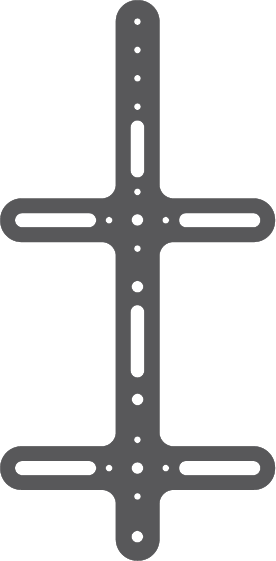
Both designs use four lateral slots with P-clamps to attach to the aerobars with some positioning flexibility. I’ve found a source for high-quality, dimensionally precise P-clamps with silicone coating for a little vibration damping. Both designs require straight sections of aerobars to clamp to, and will work better on “J-bend” bars than “S-bend.”

Each design has its pros and cons.

The first one (“New York Style”) is being produced out of thin 6061 aluminum, but could be made of carbon fiber. It gives a little more room for different attachments, and might be a better basis for a single do-it-all mounting base.

The second (“Chicago Style”) is being produced out of .25″ 6061 aluminum (could get it as thick as 0.5″). This is thick enough to tap the holes, which obviates the need for separate nuts (or other fixtures). There are some limits on what SendCutSend can do–for instance, it can’t tap an M3 hole in a thicker plate than this. Because of the material’s inherent rigidity, the fore and aft slots can be closer together. This lets it fit on bars where there’s a relatively short straight section, which might make it feasible on S-bend bars.

Both designs provide a bunch of mounting holes for specific purposes. I’ve got one set of AMPS holes for installing a Quadlock mount. The New York Style plate has a few Garmin/Wahoo combo hole patterns, holes for mounting a bottle cage, and holes for GoPro bases–these serve as a sort of universal adapter for lots of gadgets. Many kinds of headlights can be used with a GoPro adapter; there are also Garmin/GoPro adapters, which give you control over the viewing angle. This particular iteration of the Chicago Style plate has fewer mounting options.

Update

I’ve received my first “New York style” prototype, mounted it, and taken it for a good test ride. The plate is 0.125″ 6061 aluminum and it feels much more solid in the hand than I expected. The plate by itself is 89 grams; with bar clamps, a Garmin mounting “biscuit” and a couple of GoPro mounts, 195 g. On a “grams per gadget” basis, this works out heavier than most out-front mounts, but not by a big factor. I’ve also received but not used my “Chicago style” prototype, and despite being twice as thick, the smaller footprint means it’s about 10 g lighter. A slightly longer center section would make it more functional.

The plate itself is a little rough around the edges, literally. The fabrication service I used doesn’t offer edge-chamfering. If they did, I’d use it. That said, unless you plan to spend a lot of time stroking its perimeter, this won’t be a problem.

It was absolutely solid and silent on my ride. Having received it and used it, I can see some ways to optimize it. It’s definitely overbuilt.

Interested in getting one of these? I am soliciting input for a small production batch..

A prototype of a plate for mounting accessories between aerobars

Shown with 2 headlights, a Quadlock phone mount, and a Garmin mount,

Shown with 2 headlights, a Quadlock phone mount, and a Garmin mount,

Shown with 2 headlights, a Quadlock phone mount, and a Garmin mount,

Finally, I’ve developed a variation on the “Chicago style” plate above that you might call “Chicago style with everything” — this has room for two Garmin 830s, a headlight, and a water bottle. Or skip the water bottle and add an undermount headlight. Or skip the Garmins and add a phone. This measures slightly less than 100 × 200 mm. This is realistically about as much will fit.

A design for an accessory mounting plate

Pace Bend Ultra 2022

On February 5–6, I competed in the Pace Bend Ultra. There were a number of divisions: 6-hour, 12-hour, 24-hour, solo and teams, men, women, and mixed (for teams). The idea is you ride around a loop as many times as you can until you reach your time limit. I competed in the 24-hour solo division. This was my first attempt at anything like this.

This would have been difficult under ideal conditions, and the conditions were not ideal. The overnight low was forecast to be 25°F; I had the temperature displayed on my bike-computer app, and when it was showing 31°F, I heard that the actual temperature measured on the course was 27°F. That’s really cold. I’ve commuted at roughly that temperature, but my bike commute takes 22 minutes each way. I was very anxious about the cold in the days before the race, and I wasn’t sure if my preparations would be adequate.

The course is a 6.2-mile loop inside Pace Bend Park, about an hour’s drive outside of Austin. Apparently the course used to be notorious for it’s “meteor impact” pavement, but a couple of years ago it was resurfaced, and is currently pretty nice.

The race started at noon on Saturday, with all the 12-hour and 24-hour riders departing together. This being a time trial, drafting is not allowed, but because of the relatively crowded mass start, we had a pass for the first lap.

My first two laps I was running hot—the trick with distance riding is to keep your level of exertion in a limited range—not too high, so you don’t burn all your matches prematurely. I was a little worried about that, but by the third lap, I was able to get it under control. I later heard from another racer who felt the same.

I had looked at the course elevation profile beforehand, and was not too concerned about the hills: 312 feet of climbing per lap, or about 50 feet per mile. No big deal. What I didn’t realize until I was a few laps into it is that while none of the hills are particularly difficult, you’re never not on a hill. You never have a chance to hunker down and motor. I was constantly finding I was in the wrong gear.

My fueling strategy worked pretty well. I spent a fair amount of time researching that, and while I learned a lot, I ultimately went with my gut (sorry). I made up a batch of big oatmeal-raisin cookies, and a bunch of small chicken-salad tacos. Every 2nd and 4th lap, I would eat a cookie, and every 6th lap I would eat a taco. I would need to pull into my pit station to eat the taco, which was fine—on the advice of a more experienced ultra rider, I planned on taking a pit stop every six laps anyhow; I’d refill the cookies I was carrying when I did that. Eating the cookies while riding was a little more difficult to manage than I anticipated, but I’m sure I could solve that problem. My hunger went up and down—there were points when I was really hungry, and then later, not too hungry. I was able to stick to this eating schedule pretty closely for all my time on the bike, but once it got dark, I decided it would be better to stop to eat my cookies than to eat them on the fly. I thought about using liquid fuel, and ultimately decided against. During training, I experimented with some liquid options, and they didn’t sit well in my stomach. I also tend to under-hydrate, so even on a hot ride, I wouldn’t get a lot of calories that way. According to the Training Peaks estimate (I don’t have a power meter on my bike), I burned 10,500 calories, which sounds about right. About half of that probably came from stored fat (which would be less than 2 lb).

At 6 hours, I felt like there was a turning point in the event. It was getting dark and cold, everyone had burned off the last shred of nervous energy, and we were all settling into the pace that we’d maintain for the rest of the race. It was at about this point that I started adding layers for warmth. I started out wearing a high-tech base layer, a jacket, cold-weather shorts, leg warmers, cool-weather gloves, insulating wool socks, and lightweight booties. At around this point, I added a beanie under my helmet and a wool base layer. Later I would add a fleece neck buff, my rain jacket, and a pair of running tights; I also swapped my gloves for warmer ones.

At 11 hours, I discovered the warming tent. It was not especially warm—I could see my breath in there—but it was warmer. It wasn’t provided by the event organizers, but by a team: there were some people helping their teammates providing de-facto neutral support, and they gave me soup and hot chocolate in addition to a warm place to sit and socialize with other racers taking breaks.

At 12 hours, I had all my extra layers on and still couldn’t get warm—I was shivering uncontrollably in my core. One of the guys in the warming tent who was there in a support capacity lent me his jacket (which was big enough to fit over the 4 layers I was already wearing) and it made a huge difference.

At 13 hours, I was riding a little erratically on the road, and I was really worried about my ability to ride through the coldest part of the night. When I stopped in the warming tent, I realized I could take a nap and just sleep through that part, and I gave myself permission to do that. My attitude and riding improved immediately.

At 15 hours, I decided to take that nap in the warming tent, where there was a cot. I had a sleeping bag with me, but I never really got comfortable enough to sleep. It was miserable. At some point I moved from the cot to a reclining folding chair, and while I didn’t sleep there either, I found it more restful.

At 20 hours, just before 8 AM, I ended my pretend-nap, at which point the sun was out and the temperature had risen to the freezing point. I was not very refreshed, but I was riding a lot better than when I had stopped for my so-called nap.

At 21 hours, the 6-hour division started. While there were obviously some hardcore time-trialists in the 12- and 24-hour divisions, the 6-hour division had a higher percentage—I think that was the only division where people were using disk wheels. They would rocket past me on their TT bikes like I was standing still. There was also one hapless guy in the 6-hour division who must have seen an ad for the event and thought “that sounds like fun.” He was riding a hybrid, wearing basketball shorts and knee socks. It was clear he was not an experienced rider. I think he rode two or three laps and packed it in. I can only imagine how he felt lining up at the start with guys who looked like they were riding spaceships.

Gwen also showed up around this time with food. She crammed a homemade biscuit with gravy in my mouth. I was glad to see her.

At 23 hours and 15 minutes, I packed it in. At that point, my lap time was about 30 minutes (partial laps are not counted), so I could have squeezed in one more lap, but I was starting to ride erratically, and decided it wasn’t worth it.

At the end of the race, I learned that I was one of only two competitors who didn’t have a car to warm up in. I think that made a difference. There’s no telling how I would have fared if I had been able to warm up every few laps, or if I had been better insulated, but if I had ridden through that five-hour pretend nap at my last-lap pace, my distance would have been right around 300 miles, which I had predicted to be my “realistic-optimistic” distance.

I knew, but kind of forgot, that my body cannot regulate its temperature when I’m exhausted: if it’s the slightest bit cold, it’s hard for me to warm up. I definitely experienced that in the race. Part of the problem is that as I get worn out, I can’t push myself as hard and can’t raise my heart rate, so I’m generating less heat, but there’s something else at work too. I’ll need to be careful to be better insulated if I do anything like this again.

Final results: 241.8 miles, 39 laps. 2nd place in the men’s solo 24-hour upright-bike division (out of five), first in my age group. My actual time in motion was 15:34.

Experiments mounting a phone to clip-on bars

I’ve been playing around with the best way to mount my phone and headlight on the aerobars of my distance bike. This is a weird setup: most cyclists use bike computers that are considerably smaller than my iPhone 11, most don’t also have a bike light hanging from the same mount, and most definitely don’t have both of those mounted to clip-on bars instead of their regular handlebars.

I started with this bridge-style mount I found on AliExpress. It’s a mixed bag. The aluminum parts—the bridge, the computer-mount base, and the GoPro mount—are well made. The plastic parts—the bar clamps and Garmin mounting “biscuit”—are worthless: both the Garmin base and clamps quickly cracked. I like the bridge design, and thought it might give me more flexibility to mount other stuff, but in reality, it gets pretty crowded on the bars, and having two clamping points just makes it harder to adjust the clip-on bars.

I wound up getting Kevin Brown to machine a couple of very skookum aluminum clamps to replace the original plastic clamps, and I used the business end of a QuadLock intended for a motorcycle to replace the original mounting base; this is reinforced with some Sugru to stabilize it on the bridge.

This works. This is the setup I used in my abbreviated attempt at TABR 2021, and it didn’t give me any trouble. It is absolutely stable, but it is kind of heavy for what it is: 124 g.

The QuadLock mounting mechanism is excellent. I tried using the QuadLock mount by itself, but couldn’t quite get the phone positioned right, and in any case that didn’t give me a way to mount my headlight. There’s an articulated arm between the Quadlock mechanism and the bar clamp with toothed interfaces at each end, so that the angles between parts are stepped; the arm also has a little rise to it. The mount is all injection-molded plastic, and is probably adequate but nothing special. In hindsight, it looks like using a QuadLock out front mount pro sideways on a clip-on bar might work.

I then tried out this mount from 76 Projects. This is all 3D-printed and shot-peened plastic (a manufacturing method I’ve never heard of before), except for the screws that hold it together. It clocks in at 47 g. It uses velcro straps to mount to the bars, and comes with a set of spacer tubes to make up the space between the central mount and the strap blocks. Getting the spacers exactly right is fiddly, but you only need to do it once. The spacers and central mount fit together with toothed interfaces, and this is the only clip-on bar setup I’ve seen that lets you adjust the angle at which the phone faces you.

The 76 Projects mount is made of a much higher grade of plastic than came with my AliExpress mount (I also ordered a Garmin stick-on adapter for my phone from 76 Projects, which is similar): despite also using a Garmin mount, I haven’t had any problems with that. The problem I do have with this mount is that it it’s not rigid: either the velcro straps have a little play, or the stacks of spacers do, so the whole assembly wobbles a bit, probably exacerbated by the weight I’ve got on it. This is more of an issue for me because I have a headlight hanging from the GoPro mount on the bottom, cantilevered on a short extension, and it’s distracting to have the beam wobble up and down.

I backed a Kickstarter project from Peak Design and wound up with their out front mount. This clocks in at 101 g with the GoPro attachment. Normally I wouldn’t use an out front mount with clip-on bars: it would need to be located between a clip-on bar and the stem; this would force the bars to be moved outboard, which I don’t want to do. This one, however, comes with 7/8″ shims (which fit clip-on bars); the mounting surface works when rotated 90°; and by a stroke of luck, when mounted to my clip-on bars, this almost perfectly centers the mount: my clip-on bars are spaced 124 mm OC, and the Peak Design’s mounting surface winds up being 65 mm inboard. That 3-mm deviation from center doesn’t trigger OCD for me; for anyone who wanted to use this system on bars spaced much differently, their motorcycle bar mount puts the mounting surface on an articulated arm (somewhat like the QuadLock one), so it should be possible to center. The out front mount is pretty beefy, and the motorcycle mount is heavier still.

This mount is nicely made and well thought out, with all the major parts being aluminum. Everything feels very precise and substantial; the GoPro mount fits in place of a little conical washer and snugs up just so. The attachment mechanism is clever: magnets snap the phone to the mounting surface in exactly the right position, and two spring-loaded claws click into recesses in the phone case/adapter. It’s very satisfying and easy to clip the phone on. Two buttons on the underside of the mount retract the claws for removing the phone (only one claw really needs to be retracted). I found that the release buttons were easy to operate with thin gloves on, but might be a problem with more heavily insulated gloves.

I did find that without having the clamp really tight, the mount did rotate slightly after riding on rough roads. It would probably be a good idea to put a strip of helicopter tape on the bar to provide a little traction, especially if you’re using carbon bars that shouldn’t have too much clamping force applied.

This is the first one-sided mount I’ve really used on this bike, and once I got it set up, I realized that my clip-on bars are splayed out slightly, so in addition to being slightly off-center, my phone winds up being angled parallel to one bar. This will be easy to fix, but using a bridge design sidesteps the problem. I really like this attachment mechanism and will probably wind up tinkering to see if I can improve the connection to the bars.


None of these weights include the cases/adapters that goes on the phone, but those weights are minimal.

For a while, I have been noodling over the idea of an accessory mounting plate that would secure to the clip-on bars at four corners. All of the loads could be attached inboard of the corners rather than cantilevered, so each attachment point could be lighter—perhaps just a velcro strap and rubber bumper. Bikepacking racers frequently have a bunch of stuff on their bars—some combination of two headlights, two bike computers, a water bottle, a Spot tracker, a GoPro camera. If you could get even half of that stuff on a single plate, you’d be ahead of the game.

Wildcard Bicycle Novelties

wildcard bicycle novelties headbadge

Something reminded me of a website I visited years ago, Campy Only, where Campagnolo aficionados would congregate to rejoice in their shared disdain of Shimano. I always thought this was silly, and when I built up my Bob Jackson (more than 20 years ago now), I made sure that it had one Shimano part mixed in with what was otherwise Campy parts, just in case I ever ran across one of those guys. That website is long gone (its creator went on to start a blog, which seems to be abandoned), but I got the idea of recreating the old Campagnolo oval logo, but with “Shimano” in its place, thinking it would tweak any Campagnolo purists out there. I noodled around with that and was pleased with my results, so I kept going, reimagining some other logos.

I decided to do something with those designs, so I had them printed up as stickers, set up a Threadless shop for print-on-demand t-shirts, and set up Wildcard Bicycle Novelties as a storefront. Any profits I make before the cease-and-desist orders roll in will go to World Bicycle Relief.

Scroll to Top