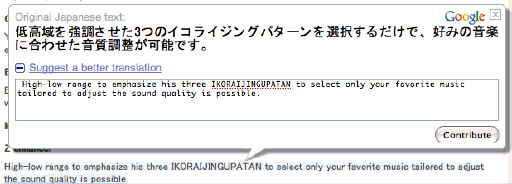
I clicked through a link from a gadget site to a machine-translated press release for a new car-stereo head unit. I noticed that when my cursor hovered over a block of text, one of those floating mock-windows that are so popular in web2.0 appeared. It permits readers to enter their own translation for that sentence or chunk of text.
This is interesting, and something I hadn’t noticed before. It raises all kinds of interesting questions. Most obviously, how do they vet these reader-submitted translations? But it’s fascinating as a machine-translation paradigm. There are two general approaches to MT: one is basically lexical and grammatical analysis and substitution: diagramming sentences, dictionary lookup, etc. The other is “corpus based”, that is, having a huge body of phrase pairs, where one can be substituted for the other. And there is a hybrid between the two, that uses the corpus-based approach, but with some added smarts that permits a given phrase to serve as a pattern for novel phrases not found in the corpus (this is also pretty much how computer-assisted translation, or CAT, works). I wonder how these crowdsourced submissions work back into the MT backend—if they’re used strictly in a corpus-based translation layer, or if they get extrapolated into patterns. I’m skeptical that they’re getting a significant number of submissions through this system, but if they did, the range of writing styles, language ability, and so on that would be feeding into the system would seem to make it incredibly complicated. And perhaps a huge jump forward in improvement over older MT systems…but perhaps a huge clusterfuck of unharmonized spammy nonsense.
Pingback: Google crowdsourcing translation at 290s global user experience blog