Big time

You know you’ve made it when people think they can make money off you.

Austin Bloggers has been around as a loose community for years now, and is one of the older community-aggregator sites around. At last night’s meetup, two people attended because they see the community as an opportunity to make a buck.

One of these guys is not a blogger himself. He doesn’t have a blog. He does, however, have an excellent command of the most annoying buzzwords on the Internet today, which he flings around with unironic abandon as if this will impress us: his company is all “web 2.0” and “user-generated content.” Web 2.0 in this case apparently means “shiny” and user-generated content means “you fill up my site for no pay, and I make money off it!”

The other guy is a blogger, and has what sounds like an interesting blog, but again, he was there to sign up people for something that would benefit him: he’s developed a bit of code that bloggers can put on their blog-templates that will show a box with headlines from other bloggers in their community. This in itself is not particularly innovative (and has been implemented hundreds of different ways), although his has the interesting twist of putting together headlines from multiple sources. But the box always has a little link to a “sponsor” at the bottom. The sponsor has paid him money, he has given you this little code snippet, and in return, the sponsor gets to use your blog as part of a link-farm to get more google-juice. This guy at least had the good grace to realize that what he’s doing is slightly exploitative

Gosh, where do I sign up?

Go with the workflow

In “A Feature Request for Apple Mail”, Jochen Wolters talks about introducing workflows into Mail.app. I think this is an interesting idea, but it doesn’t go far enough. Mail may be the app where many of us organize most of our administrivia, but it isn’t the only one. Apple should give better exposure to the excellent metadata system it created for OS X 10.4, and make projects and workflows canned datatypes in it. Apple is already taking baby steps in this direction with the to-do service built into the future version of Mail

How would this work?

Let’s take a typical translation job for me. It may involve four or five e-mail messages, a couple PDFs, and a couple of Word documents; if I wanted to get really organized, I’d add an item to my calendar showing the deadline. These are all disparate types of data managed through different applications, but they’re all related. Every job goes through a few stages (some of which are often skipped): inquired, estimated, accepted, underway, completed, invoiced, paid. Different activities may have different workflows (I’d need a completely different workflow for my fire-equipment business). So I need to A) define general types of projects and the steps of a workflow associated with each one; B) conveniently set up new projects and indicate their project types to pipeline them into a specific workflow; C) conveniently associate messages, files, etc, with a project; D) view and change the state for each workflow. It needs to be dead-easy: the marginal effort to assign a message to a project rather than just skip to the next message needs to be vanishingly small. I imagine hitting a magic key that pops up a list of active projects to choose from (with the option to create a new one); if any text is selected, a new project is created with that text as the title.

Mail Tags permits something like this, after a fashion, but only within the world of Mail.app. This might be enough if you’re content to use mail as a PIM, but I’m not (and it would get ugly trying to deal with files, and Mail Tags does not currently work with IMAP as described in that article). What I’m describing would need to be a system-level feature that was exposed in mail messages, setfile dialog boxes, the Finder, etc.

Projects could be viewed through the Finder, like smart folders. The viewing window for mail messages could include a banner showing a menu of pending projects to select from; once a message was assigned to a project, a row of buttons would be used to show and change state (this could also appear in the Finder window for the project).

Update: After doing a little more noodling on this, I’ve come up with the following bezel displays
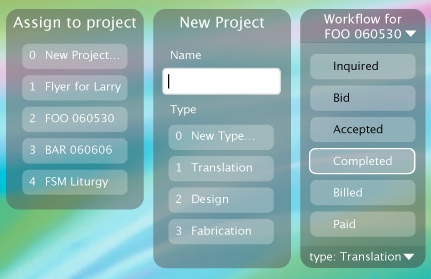
workflow bezels

The three would not all appear at once. I envision that for an unassigned file, the magic key would bring up the first; if the user selects “New Project…” it transitions to the second; pressing the space bar would flip it to the third. For a file that has been assigned to a project already, it would go directly to the third. Those aspects of the workflow setup that couldn’t be controlled through this interface would probably be handled through a preference pane. The bezel would act on whatever document window is foremost.

At a basic level, there’s almost nothing in the data model for this that couldn’t be handled through OS X’s existing metadata constructs; the one thing that could not be would be a table associating project with project type/workflow. And so there’s no reason a third-party developer couldn’t do this right now. At a more advanced level, ideally there would be hooks added that would tie project-related events to other events, for example, when the mail client is foremost, setting a project on a message might close that message and move to the next. In MS Word, saving a file with no project would bring up the project-assignment bezel.

In fact, there’s already a program, SpotMeta, that lets users create enumerated types of metadata and apply them to files. As clever as it is, it’s a little clunky to use, and doesn’t have a straightforward way of working with mail messages, iCal events, etc (though technically, it could work with them).

Dealing with items that have been tagged with a project and workflow state could mostly be handled through smart folders in the Finder, in Mail, etc. Ideally there would be some kind of universal viewer (most likely hacked onto the Finder) that could show the contents of all the various datatypes corralled into a workflow.

The goggles, they do nothing!

I underwent LASIK treatment yesterday.

I’ve been very nearsighted (20/400) since I was in 6th grade, and from the day I first wore glasses (on a class trip to Springfield), not another has passed where I haven’t. I’ve been ready to be done with them for a long time, and finally got around to it.

The procedure was very weird. Lying back in the chair, things happened to me very quickly. It’s impossible to see what’s going on, but I’m familiar enough with the procedure to know “they are attaching the vacuum clamp to my eyeball…rotating over to the flap-cutting laser…cutting the corneal flap…folding back the flap…ablating the cornea…smoothing back the flap.” The whole process took less than five minutes. Gwen watched the whole thing in horror and amazement (which is pretty much how I felt when I watched her go through it about a year ago). When Gwen had hers done, they gave her valium that kicked in before the procedure started, so she was checked out the whole time. They gave me valium too, but it didn’t kick in until after I was home. So I lay there, rigid, thinking in the abstract about what was happening to me, while the actual events were proceeding with well-practiced speed above me.

Right now my left eye feels kind of scratchy. Both are bloodshot. Light sources have haloes around them, and my vision feels a little off—a little hazy or something. It’s hard to describe. Nothing out of the ordinary from what I understand. But my acuity is good. Predictably, my near vision has suffered a little—it’s hard to focus closer than 3.5“ away (that’s still very good, of course). I’ve got a follow-up appointment tomorrow morning.

Not putting on glasses is a weird feeling: I tried on my old glasses and was bowled over at the funhouse-mirror effect.

Now, for the first time in my life, I can buy cheap sunglasses. Or expensive ones.

Quote of the day

“Do you want to drive to farmer’s market or ride our bikes?”

“It’s hot enough out that I don’t mind contributing to global warming.”

(Yes, I actually did say that.)

Jabberwocky in Japanese

Language Hat posted links to some translations of Jabberwocky, which has been a pet interest of mine ever since I saw the French and German translations in GEB. Someone, years ago, sent me a bunch of Japanese translations of Jabberwocky, and they’ve been languishing on my hard drive ever since. Now seems like a good time to get them out there.

I am posting these with minimal formatting because I’m lazy. Headings are translator names. Notes and credits are as I received them. See after the jump.

Heaven, Hell, or Houston

Gwen and I took off for Houston this past weekend to catch the Body Worlds exhibit at the Houston Museum of Natural Science. Pretty mind-blowing stuff. I’d taken an anatomy class and dissected critters, but there’s something different about seeing actual cadavers, opened up and perfectly preserved, being able to walk around them, seeing how everything fits together, seeing healthy organs next to diseased ones. That sort of thing. Makes me want to take better care of myself. The exhibit is ending there soon, so make plans now if you have any interest.

We spent the night at the Hotel Derek (which apparently people who go to Houston know as a trendy type of place), and I goggled at the $5 water at the minibar. Makes me wonder about the economics of these hidden costs. The hotel only permitted parking via valet service; this was the first time I’d ever used valet parking, which has always rubbed me the wrong way. The current popularity of it mystifies me; its presence at suburban locations with empty parking slots 20 paces away from the front door astounds me.

At a friend’s suggestion, we had dinner at a sushi joint called ら, which was fine if you like dance clubs. The sushi was tolerable, the wait was long, the decor was chic, and the music was much too loud to permit conversation. Just to be unHoustonian, we walked there from our hotel, about 10 blocks down Westheimer.

Saturday we went to the Menil, which was also very worthwhile. They had an exhibit of surrealist art (nothing by Dali, but plenty by Yves Tanguy, who I discovered is very, very similar). For whatever reason, the surrealist exhibit was very dimly lit; I was reminded of a Dali at the Art Institute of Chicago, “The Invention of the Monsters,” which had faded so that one of the figures originally on it was completely lost, and I wondered if perhaps surrealists were notorious for painting with shitty paints that faded easily, which would explain the dim lighting. It occurred to me this would be an interesting technique to use intentionally, so that the original image changed over the decades to reveal something completely different. Perhaps something on the theme of Ars longa, vita brevis.

Driving out of town, we got a little bit lost, but happened upon the Art Car Museum. Sadly, we were running short on time at that point, so we decided to save it for a future visit.

As as Austinite, I ridicule Houston almost as readily as I reminisce about Austin-that-was. That’s not entirely fair: there’s a lot of cool stuff in Houston, and despite the atrociousness of its sprawl, the center of town is much more of a real city than Austin is. Still, it falls in the “nice place to visit, wouldn’t want to live there” category for me.

Zooomr

andrea poi 05

I’ve been using Flickr to host my photos for some time, and I’ve been happy with it. And it’s one of those rare websites that seems to have established itself almost as a public utility among many people active on the web, so it seems it would be hard to dislodge. But then there are these new kids at Zooomr. Jeremy is intrigued, and as he puts it, “I’m just not sure I’m willing to give even $25 to anyone [Flickr] whose parent company might take a cavalier attitude towards helping people into prison in China.” And, shoot, Zooomr is giving away free accounts to bloggers, so what the heck.

This is an oldie but a goodie, a picture of a friend I don’t get to see often enough, on the occasion of her first burn. The smile says it all.

Mobile backup

A friend taking an extended road trip just had her car stolen, with her laptop and everything else in it. That sucks massively. It got me thinking about the problem of maintaining backups and having access to them in a situation like that.

My home computer is a desktop. Currently I have it hooked to an external drive, and backup software runs in the wee hours every night to copy my home directory to the external. At some point in the near future, I hope to get a network-attached storage drive, so that I can A) liberate a little desk space, and B) move the backup away from the computer, in case something happens the computer. Admittedly, I’d only be moving the backup about 15 feet away, but a black box wedged into a cramped closet is much less likely to attract a thief’s attention, and if the roof collapses or something like that, fifteen feet might be enough. That’s what I’m counting on, anyhow.

But what about when you’re on the road? You need a backup medium that you keep separate from the laptop but still have ready access to, that is reasonably fast, and perhaps most importantly, is convenient to use. What are your options?

Before you can decide, you need to get your priorities in order. Some files are more critical than others; some change more frequently than others. Assuming that you will need to make compromises, you want to make sure the most current and most critical files are the most readily available and most frequently backed up.

Exclusive of media files, my home directory is about 5 GB. I’m guessing that about 1.5 GB of that is actually cache files and other digital ephemera, so to recreate my home directory, I’d need to be able to store about 3.5 GB. This would exclude all applications, music, videos, and photos. In reality, I could probably cut this in half by omitting a lot of archival files, though to do that I would need to reorganize my hard drive considerably. I’m lazy, so let’s stick with 3.5 GB as a target.

So, what are my options?

iPod
It just so happens that I have a 4 GB iPod Nano (rumor has it that these will be bumped to 8 GB soon). This would just accommodate me, plus a few hours of music or whatever. A hard-drive based iPod would have no trouble at all; in fact, I could store my home directory even with most of my media files on a 60 GB model. The potential problems here are that I would need to be scrupulous about keeping my laptop and iPod separate, and the temptation to keep music on the iPod, even if it cut into my storage requirement.
Network
My web-hosting company gives all its customers 20 GB of storage and webdav access. Webdav is pretty cool, because it lets me mount my network storage just like a hard drive on my desktop. A really, really slow hard drive, but there it is nonetheless. If high-speed connections could be taken for granted, this would be the ideal option—putting my storage in a remote datacenter that has its own redundant backups etc. But high-speed connections are hardly universal, and even when present, the upstream rate can be pretty slow. Backup software generally only backs up files that have changed since the last backup, but even with only 10 MB to back up, over a 128-Kbps upstream line, that will take at least 10 minutes (allowing nothing for communications overhead). In terms of convenience, this can’t be beat, assuming the connection is there. Make sure the remote volume is mounted and let the backup run. This is the only option that can be run unattended and still keep the backup volume physically separate. Having it on the server means I don’t need to even use my own computer to get at it; better still would be to have it in some web-readable format so that I could read it from any computer with a web browser. Thanks to Google, a lot of people are moving in this direction anyhow. I’m not entirely comfortable with that, and I get benefits from programs that run right on my computer that I’d be unwilling to give up, but perhaps if I had a more mobile lifestyle, I’d make a different tradeoff. And I do essentially do this already with my photos, by uploading them to Flickr.
Optical storage
Most newer laptops can burn to CDs at least, and in many cases to DVD. A single-side, single-layer DVD can store 4.7 GB, so I’m in the clear there. The drawback here is convenience: you need to go to more trouble to insert the disc, set up the burn session, burn the disc, label it, put it away somewhere, hope that it doesn’t get scratched before you need it, etc.
Flash drive
While this is technologically equivalent to the iPod Nano (and comes in the same storage sizes), I see a few key differences: there’s no particular temptation to use the flash drive for music, and you can hook it to your keyring. For this reason, I like this solution best for the most critical and current data: if the drive is on your keyring, you’re less likely to leave it connected to the computer. Well, I’m less likely, anyhow. This does require me to launch the backup manually, though.

I can imagine a multi-layered approach where I use a thumb drive as my primary backup for working files, bring a DVD that I burned in advance with some critical applications, occasionally burn a CD or DVD with photos (possibly snail-mailing it home), and occasionally upload my very highest-priority stuff to the server when I can take advantage of a fast connection.

Mistaken for a eunuch at an orgy

I’ve heard before about conventional media (or indeed, any commercial enterprise) trying to co-opt bloggers into creating buzz for whatever they’re selling. At one point, I was offered a pass to a movie, and it was made clear that it was because I am a blogger, and no doubt a Highly Influential Opinion Leader. I wound up not picking up the pass or seeing the movie, but it’s the thought that counts.

I have just received an unsolicited and unexpected UPS delivery of a new book. Interestingly, this was sent to the address I had for only about half a year, but someone at UPS apparently knew I had moved and redirected it to the right place. I’m not quite sure how they got my old address (and since it seems likely that whoever was behind sending me the book in the first place is monitoring this blog, please do chime in in the comments).

Rather than reviewing the book—because that would be playing right into their hands—I will review the mailing instead.

The packaging is stiff manila cardstock, and the book arrived in good shape with a press packet tucked inside. The press packet is six letter-sized sheets of glossy paper printed monochrome, double-sided. The cover letter addresses me as “Dear Producer/Editor.” They say you should always open with a joke, so this is off to a good start. I am advised that the book I am about to enjoy was reviewed as being a “winning comedy…with cracking prose and sharp observations that consistently entertain and surprise.” According to the publicist, Kristan, it is “spellbinding and wickedly funny.” I also learned the book has been optioned for a movie (seriously, has any book not been optioned? I’m pretty sure even the phonebook has been). The author managed to squeeze a colon and parentheses into the title of his previous book, and that punctuation note alone should tell you this guy is trying way too hard. The book in my hand has only a colon, which suggests either that he’s getting a grip or that he’s just given up.

The packet includes a schedule of the author’s appearances, including one in (surprise) Austin in late July. So they’re giving me a month and some change to read the book and blog about it so that my rapt audience of discerning readers will be primed to go to the book signing. Kristan, I’m not a very quick reader, I admit, but I’m pretty sure it wouldn’t take me six weeks to plow through this book, should I choose to read it—I’m not really inclined to, but I’ve read my toothpaste tube twice already, so who knows.

Next we turn to a brief author’s bio, somewhat longer than the typical inside-back-cover bio (which is coyly brief in the book itself). It is entirely precious, telling us the author’s astrological sign in a tongue-in-cheek way, recounting the series of awful jobs the author has had, his sad litany of rejections from “every established press in North America,” his shameful descent into self-publishing and then redemption at the hands of a major publisher. And, saving the worst for last, it appears this poor schmuck has a blog.

For dessert, an interview with the author running three and a half pages. I won’t bore you with it because I didn’t bore myself with it, except for the penultimate question and answer, which did catch my eye:

What’s the one thing you’d like readers to know about you that they may not already know?

I want my readers to know how grateful I am that they have given me 5 to 8 hours of their busy lives to read my books.

Now, this may be sincere, but it comes across as an incredibly calculated “oh gosh, thank you for reviewing my book,” showing up in this review-copy press packet as it does.

On the whole, I’d say this press packet does a good job of making me not want to be a book reviewer.

renovation post-mortem: kitchen

Kitchen Main View-1

Now that we’ve had some time to live with the decisions we made in our renovation, I’m going to occasionally look at how different aspects of it turned out.

The kitchen is typically the most functional room in the house, and receives the biggest investments in appliances and built-in furniture. So let’s start there.

On the whole, our kitchen turned out really well. But there are a few areas where we could have done better.

Scroll to Top