Leopard initial reactions

Rather than buying a new computer, I’m updating my old one right now, and installed Leopard yesterday.

Normally when I install a major upgrade, I do a “clean install”—reconstructing my old environment by manually importing old files and recreating preferenecs is admittedly laborious, but it gives me a chance to re-examine what’s on my hard drive and jettison stuff I never use. I cloned my boot drive to an external drive, and selected the erase-and-install option in the Leopard installer. After that finished, it offered to import my old setup from my external drive. For some reason, I chose this option, and regretted it, as it faithfully imported every bit of cruft from my old system, some of which caused Leopard to lock up. Apart from that, I have to admit it did a sterling job—every jot and tittle was in place. It would be nice if I had more control over what got imported and what did not.

Tried again with the clean install, followed by manual copying of specific folders and files. I had a little trouble importing my old Mail folders, and discovered that I had to export my Address Book data (using Address Book running on a different computer) before I could import it to Leopard. And then I discovered one of those annoyances only a geek could love. For whatever reason, my short user name was now adamjrice. It has always been adamrice in the past, and this change was, of course, unacceptable. The path to my $HOME directory had changed similarly. One new and appreciated feature in Leopard is that it’s actually easy to change this: right-click on your username in the Accounts prefpane sidebar and it gives you the “advanced options” to fix this. Nice. However, it makes this change by creating a new $HOME directory with defaults, not by moving the old one, and instantly, silently migrating you to that. This causes weird and unwanted results. My advice: if you are going the clean-install route, check to make sure you are happy with your short user name before you do any customization. Fix it if need be, and log out/relog.

Other than these breaking-in pains, so far I’m happy. My computer is noticeably faster (not just subjectively—apps open faster, and Second Life, a poky pig, ran at about 2x the framerate making it almost tolerable), although this may have as much to do with blowing out some crufty haxies as anything else. Network throughput likewise seems to be faster, but I haven’t measured this.

QuickLook is probably worth the price of admission all by itself, especially if you can get plugins for the files you use the most. Last night, Gwen was trawling through a directory full of EPSs with meaningless names. Even though she’s still running Tiger, I mounted her drive, installed a QuickLook plugin for EPS, and was able to browse most (not all) of those files with previews in a couple of minutes. Big win. Coverflow in Finder, which seems like a frill, is useful in the same way QuickLook is, especially when, say, trawling through a directory full of meaninglessly-named EPS files.

As others have mentioned, Spotlight has gone from sucking to not-sucking. I reiterate that fact simply because the transformation is so stark.

So far, I’m calling this a success.
My brilliance cannot be contained, episode 2,336

Gwen and I saw something about lap-band surgery on TV recently, and I was struck by an idea. Instead of gastric-bypass, lap-band, stomach-stapling, and other forms of bariatric surgery, which are both risky and prone to complications, doctors should introduce therapeutic tapeworms.

I dedicate this idea to the public domain, in the hopes that someone will take it and run with it. I can’t believe nobody’s thought of this before.

Technology on the bike

2007 hasn’t been a good year for cycling, at least not for me. I recently made a birthday resolution that in 2008 I would ride more.

Along with riding less, I’ve paid less attention to bike technology, which is something that’s always interested me. Lately I’ve been paying a little more atention. I just read about a prototype bike-computer/rear-view camera called Cerevellum. This looks like a great idea—plug-in modules for different functionality. One idea I’ve never seen implemented on a bike is a crash camera. Now, this might be more of a concern for me than most people, but the overhead would be slight and the potential benefits considerable.

I envision the system including rearward-looking and forward-looking cameras, an accelerometer, and some flash-memory storage. It wouldn’t need much—just enough to capture about a minute’s worth of video and audio (about 180 MB for good-quality uncompressed video—chump change by today’s standards). If the accelerometer detected any sudden movement (indicative of a crash), the cameras would save the preceding 30 seconds and the following 30 seconds. That should be enough to capture license plate numbers, the circumstances of the crash, etc. A manual trigger to save would also make sense, as would manual still photography capture. Equipment like this does exist for cars, but nothing miniature enough for a bike. With 1 GB memory cards as common as dirt, one could record several minutes of footage per ride, as well as a lot of still photos, which could be interesting in ways other than crash documentation.

Translation and situation

I’m translating segments of a Japanese TV show right now. It’s very different from my usual work, and not what I consider a strong suit, but the client seems happy with my work right now, so I’ll take it.

This particular show is of the “physical challenge reality TV” variety. It’s sort of like the show Ninja Warrior that’s currently on U.S. cable, but much sillier and with recognizable Japanese TV celebrities as commentators and sometimes as competitors. The commentators are clearly trying to call the proceedings the way a sports announcer would, and as I go along, I’m trying to imagine how it would sound if Bob Costas were calling the games with my translation. But some of this stuff doesn’t translate. It’s not so much that I don’t know the words, or don’t know what the speakers mean by them (although that happens here and there), it’s just that they’re saying things that would never be said in the same situation in an English-speaking contest.

I just ran flat-faced into a perfect example. The game in question has the contestants trying to sit atop a gigantic ball and navigate it through an obstacle course. At one point, one of the contestants gets stuck in a hole and is rocking unsteadily and impotently, trying to get out. The commentator says “まるで現代人の日常の不安定感をビジュアル化したかのようだ,” which I have translated somewhat loosely as “It’s as if the malaise of modern life has been made tangible in his plight.”

And there’s the thing. No American sports announcer, no matter how literate, would ever say anything remotely like that in this situation. I’m content with the translation, but it’s undeniably weird to an American audience. Then again, the rest of the show is kind of weird.

Sacred cows

Submitted for your consideration:

Many religions build up arbitrary dietary rules around them.

Raw-foodism is an arbitrary dietary rule that has built up a religion around it.

A thought on the writer’s strike

As I understand it, the position of the Writer’s Guild of America is that writers should be compensated for online distribution. The studios’ position is that media distributed online has no value.

So when I download a TV show over bittorrent, I’m supporting the studios’ position. They should thank me.

Word annoyance du jour

screenshot of MS Word with two open documents

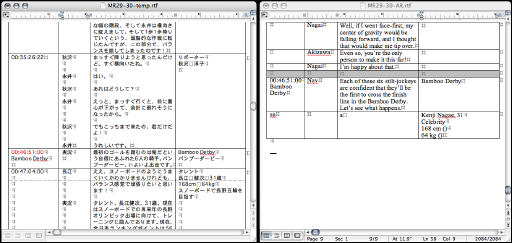
There are lots of reasons to be annoyed with Word. I’ve just discovered another one.

Look at the screenshot above. It shows two open documents in Word. Which one is the active window? (too small? You can see the full size image.)

Trick question. Neither is active. Even though these are the only two documents open in Word, neither is active. Keystrokes will not be sent to either one. Note how the title bar of the left window makes it appear to be active, while the scroll bar of the right window suggests it is active.

This condition arises erratically when the command-` systemwide shortcut is used to cycle through the windows of the current app. It only seems to happen when windows of other apps are also visible. I’m working on a job where I’m copying timecodes from the left window into the right, and the fact that I can’t use command-` to cycle is slowing me down measurably—almost as much as taking time out to blog about the problem is doing.

Horsemuffin

Folding cards for Gwen

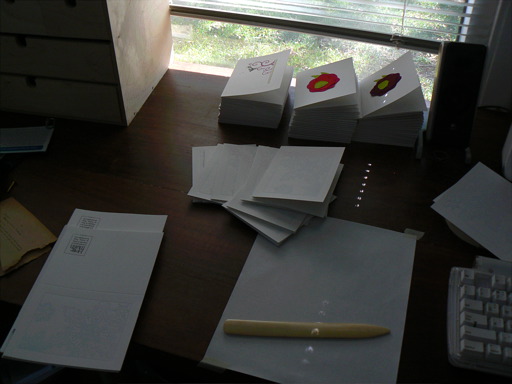
When Gwen and I bought our current house, we inherited a letterpress, vintage approximately 1920, that the previous owners could not take with them when they moved to Spain. Gwen was interested in learning how to use it, but knowing how the best-laid plans of mice and men can go, we agreed that if she hadn’t done anything with it in nine months, we’d get rid of it.

Well, she did do something—a batch of coasters (using type, ink, and stock that was also left behind). Then she made some postcards. My sister, who received one of these postcards and has her own craft business, told Gwen “if you make more like these, I can sell them.”

That got Gwen thinking. She designed a series of cards, got plates burned, bought paper and ink, and got to work. I watched.

It’s fascinating to contemplate letterpress printing. It’s a very fussy process. These days if we want a hard copy (a phrase that suggests how a paper instantiation of information is secondary to the platonic electronic form), we hit command-P and a few seconds later, a page (or many pages) pops out of the printer, perfectly rendered.

It’s a little different with letterpress printing. Assuming you bypass the laborious process of composing type and have a plate burned, you still need to affix the plate in your chase, estimate the correct amount of packing on your platen, estimate your gauge-pin positions, and print some “make-ready” to home in on the correct packing and pin positioning. Once you’re getting a uniform, square impression—a process that can easily take an hour—you can start printing. The packing (extra sheets of paper underneath your printed piece) determine how hard the plate’s impression is, and a single piece of tissue paper in the packing can make an obvious difference in print quality. And if you’re doing a two- or three-color job, you need to do all this repeatedly—and get your registration straight with the previous print passes. The whole process can go wrong in numerous ways, and our eyes are highly attuned to even subtle errors in printed matter. A piece that’s rotated so that a printed line that goes out of parallel with the edge of the card by just 1/30″ over a length of 5″ is an obvious reject.

And while we generally don’t think of printing as physically dangerous, with a letterpress, it can be. Because the equipment is, at root, a press. And it weighs about 1800 lb, running off a large flywheel carrying a lot of momentum. If your hand happens to get in the way when platen and plate are pressed together, you’re going to have a very flat hand.

In spite of the hard work, the finickiness, and the risk of grievous bodily harm, Gwen has produced a line of cards. They’re being sold at Book People, and will be sold on the East Austin Studio Tour and Cherrywood Art Fair.

Oh, and she has a website of course. Horsemuffin.

Update

I’ve been busy lately.

After a long spell with very little work, October ended with all I could handle. Add to that preparations for the annual Halloween show at the Enchanted Forest, preparations to go to San Francisco for the ATA conference, and other stuff. Now I’ve got plenty of blog-fodder piled up and don’t quite know where to start.

So I’ll start by squeezing this update out.

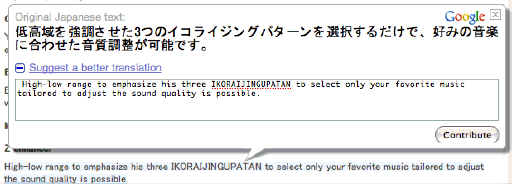
Google Crowdsourcing Machine Translation

Screenshot of google translation crowdsourcing interface

I clicked through a link from a gadget site to a machine-translated press release for a new car-stereo head unit. I noticed that when my cursor hovered over a block of text, one of those floating mock-windows that are so popular in web2.0 appeared. It permits readers to enter their own translation for that sentence or chunk of text.

This is interesting, and something I hadn’t noticed before. It raises all kinds of interesting questions. Most obviously, how do they vet these reader-submitted translations? But it’s fascinating as a machine-translation paradigm. There are two general approaches to MT: one is basically lexical and grammatical analysis and substitution: diagramming sentences, dictionary lookup, etc. The other is “corpus based”, that is, having a huge body of phrase pairs, where one can be substituted for the other. And there is a hybrid between the two, that uses the corpus-based approach, but with some added smarts that permits a given phrase to serve as a pattern for novel phrases not found in the corpus (this is also pretty much how computer-assisted translation, or CAT, works). I wonder how these crowdsourced submissions work back into the MT backend—if they’re used strictly in a corpus-based translation layer, or if they get extrapolated into patterns. I’m skeptical that they’re getting a significant number of submissions through this system, but if they did, the range of writing styles, language ability, and so on that would be feeding into the system would seem to make it incredibly complicated. And perhaps a huge jump forward in improvement over older MT systems…but perhaps a huge clusterfuck of unharmonized spammy nonsense.

Scroll to Top